
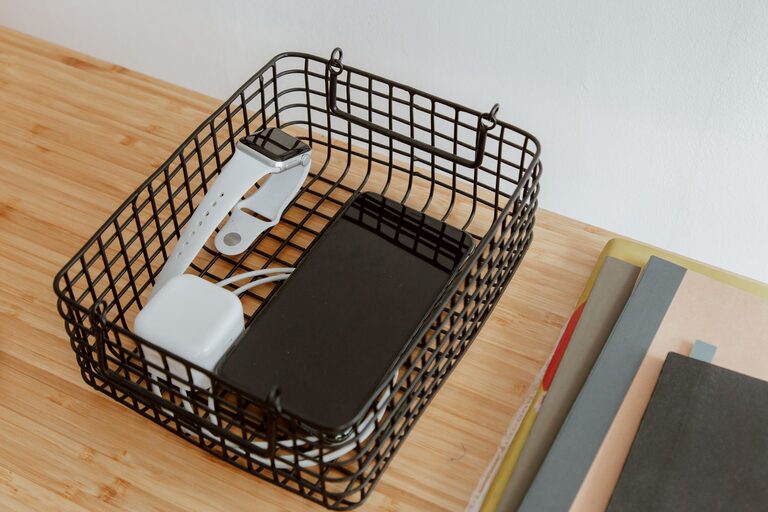
How to Set Up a Safe and Organized Charging Station
A dedicated charging station can make daily life easier. Instead of searching for cables or using every available outlet, you can keep phones, tablets, smartwatches, headphones, and other devices in one organized location.
The best charging station does more than provide power. It also reduces clutter, protects cables, and helps you keep track of your devices. With a few simple supplies and some planning, you can create a charging area that fits your home, office, or travel setup.
Choose the Right Location
Start by deciding where the charging station will go. A good location should be easy to reach but should not block walkways, work areas, or frequently used surfaces.
Consider these options:
– A desk or home office shelf
– A bedside table
– A kitchen counter
– An entryway console
– A living room cabinet
– A dedicated shelf near a power outlet
Choose a dry, well-ventilated area. Avoid placing the station near sinks, heaters, radiators, or direct sunlight. Devices and chargers can become warm during use, so the station should have enough open space for air to circulate.
If several people will use the station, choose a central location. For a personal setup, a desk or bedside table may be more convenient.
Take Inventory of Your Devices
Before buying accessories, list the devices you want to charge. This prevents you from purchasing unnecessary equipment and helps you choose the right number of ports and cables.
Common devices include:
– Smartphones
– Tablets and e-readers
– Smartwatches
– Wireless earbuds
– Portable game systems
– Cameras
– Fitness trackers
– Rechargeable keyboards and mice
Check the charging connector used by each device. Common connector types include USB-C, Lightning, and older USB designs. Some devices may use a charging dock or a brand-specific cable.
Also consider how many devices may need power at the same time. If you regularly charge four devices, a charger with four suitable ports may be more useful than several separate wall adapters.
Select a Quality Power Source
The power source is the most important part of the setup. You can use a multiport wall charger, a charging hub, or a power strip with individual adapters.
A multiport charger is often a tidy option because it combines several charging ports in one unit. Choose a model from a reputable manufacturer and make sure it is designed for the devices you plan to use.
When comparing chargers, look for:
– Enough ports for your devices
– Ports that match your cable types
– Power output suitable for your devices
– Built-in protection against overheating and overcurrent
– Clear safety and certification information
– A cable long enough to reach the outlet comfortably
Do not overload a power strip or connect several power strips together. If you are unsure whether a charger or power strip is suitable, follow the manufacturer’s instructions or ask a qualified electrician.
Plan the Layout
A well-planned layout makes the station easier to use. Place the power source toward the back or side of the station, then arrange the cables so they reach each device without crossing the entire surface.
You can use a small tray, basket, or organizer to hold devices while they charge. Cable clips or adhesive cable holders can keep charging leads in place. If you often move a device while it is charging, leave enough slack in the cable to prevent strain on the connector.
Try to give each cable a designated position. For example, the left side of the station could be for phones, while the right side could hold tablet and accessory cables. Labels can be helpful when multiple cables look alike.
Keep Cables Manageable
Long, loose cables quickly make a charging station look untidy. Use simple cable management tools such as:
– Hook-and-loop straps
– Cable clips
– Cable sleeves
– Small labels
– Cord boxes
– Cable ties designed for reuse
Avoid tightly bending cables, especially near the connector. Repeated bending can damage the internal wires. Store extra cable length in a loose loop rather than wrapping it tightly around the charger.
Replace cables that show fraying, exposed wires, bent connectors, or heat damage. Damaged cables can create charging problems and may be unsafe to continue using.
Add a Charging Tray or Dock
A tray or dock gives every device a clear place to rest. It can also prevent phones and accessories from sliding behind furniture or getting mixed together.
Choose a design that matches your devices. A basic tray may be enough for phones and earbuds, while a vertical stand can save space and make screens easier to see. If you charge a smartwatch, look for a dock with a stable base that supports its charging puck.
A charging dock does not need to be expensive. A small wooden box, desk organizer, or divided storage tray can work well if it is stable and does not cover ventilation openings.
Consider Device Compatibility
Not every charger works equally well with every device. Check the charging requirements in the device manual or on the manufacturer’s website.
Some devices support faster charging, while others charge at a lower rate. A compatible charger will usually adjust its power output to match the connected device. Avoid using unknown or poorly made adapters, especially if they do not provide clear specifications.
Wireless charging can reduce cable clutter, but the charging pad must be properly aligned with the device. Thick cases, metal accessories, or objects between the phone and pad can interfere with charging. Keep the pad on a flat, stable surface and follow the instructions that came with it.
Create a Safe Charging Routine
Good habits help protect both your devices and your charging station. Keep liquids away from the station, and do not cover chargers with clothing, blankets, or other materials that could trap heat.
Follow these basic practices:
– Inspect chargers and cables regularly
– Keep ventilation openings clear
– Unplug damaged equipment
– Avoid charging on soft surfaces such as beds or sofas
– Use the correct cable and adapter for each device
– Keep small children and pets away from loose cables
– Remove unnecessary adapters from the outlet when not in use
Many modern devices manage charging automatically, but it is still useful to keep software and device firmware updated. Use the manufacturer’s guidance for battery care and charging practices.
Label and Maintain the Station
A charging station works best when everyone knows where items belong. Label cables by device or use colored clips to tell them apart. You can also assign each family member a section of the tray.
Once a month, take a few minutes to maintain the station. Remove cables for devices you no longer use, wipe away dust, and check for loose connections. Test each cable and charger with the appropriate device if charging seems slow or inconsistent.
If the station becomes crowded, review which items truly need to stay there. Moving rarely used cables to a separate storage box can keep the daily setup simple.
Build a Setup That Fits Your Routine
The ideal charging station is practical rather than complicated. Start with the devices you use most often, choose a safe power source, and organize the cables so everything is easy to connect.
Whether you create a compact bedside station or a larger family charging area, a little planning can save time and reduce clutter. Once the setup is in place, make small adjustments based on how you use it. The most effective charging station is one that remains convenient, tidy, and easy to maintain.
